

Accessibility Audit Report
Users faced accessibility barriers due to missing alt text, weak contrast, unclear navigation, and inconsistent headings, limiting usability, especially for visually impaired users.
Process:
- WCAG accessibility review
- Checked alt text, contrast, headings, navigation
- Screen-reader testing
Website audited: Nonprofit website (anonymized for portfolio)
Audit type: WCAG 2.1 Level AA, with WCAG 2.2 considerations
Tools used: Lighthouse, Wave, Axe DevTools, manual checks



1. Introduction
I conducted a comprehensive accessibility evaluation of a live nonprofit website against WCAG 2.1 Level AA, with forward-looking considerations for WCAG 2.2. The goal was to identify usability barriers, prioritize high-impact issues, and provide actionable recommendations to improve the experience for screen reader users, people with low vision, and keyboard-only users.
My Role
Conducted a WCAG 2.1 Level AA accessibility evaluation
Performed automated and manual testing (Lighthouse, WAVE, Axe)
Reviewed site structure, contrast, keyboard navigation, and screen reader flow
Synthesized findings into prioritized design recommendations

2. Test Results (Overview)
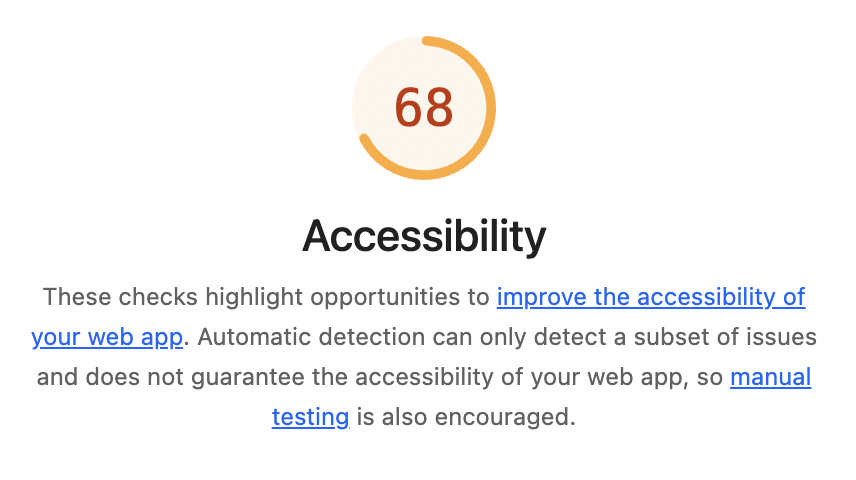
● Accessibility score: 68/100
● 5 images missing alt text (including one linked image)
● 18 instances of low color contrast between text and background
● 4 structural alerts: skipped heading levels, redundant links, small text, and a video missing captions
● 12 structural elements identified correctly (navigation, footer, lists, headings, etc.)
These findings represent the most common barriers users face: missing descriptions for images, poor colour contrast, and navigation issues that make it harder for screen reader users and people with low vision to use the site effectively.
3. Findings
The findings are grouped under the four accessibility principles known as:
POUR:
Perceivable, Operable, Understandable, and Robust.
● Several images are missing alternative text, including one linked image.
● One spacer image has incorrect empty alt text.
● 18 instances of very low contrast between text and background.
● Some text is very small and hard to read.
● A video is missing captions.
Positive:
● The page language is set correctly, and some image buttons already use alt text.
Operable:
● A few links don’t have clear names, making them hard for screen reader users.
● Redundant links appear side by side, pointing to the same page.
● Heading levels are skipped (for example, going from H1 straight to H3).
● Some touch targets, like buttons and links, are smaller than the recommended size.
Understandable:
● Headings are not always in sequential order, which can confuse assistive technology users.
Robust:
● ARIA roles such as aria and aria-expanded are present but should be checked to confirm correct use.
● Structural elements like navigation, footer, and lists are marked up properly.

4. WCAG 2.2 Considerations
Although the main review was against WCAG 2.1, I also checked for common issues covered in the 2.2 update:
● Keyboard focus should remain visible and not be hidden behind sticky headers.
● Focus outlines need to be more noticeable and meet contrast requirements.
● Interactive elements should be at least 24x24px where possible.
● Drag-and-drop actions should have alternative ways to operate.
● Help options (chat, FAQ, contact) should appear consistently on all pages.
● Forms should not require users to enter the same information more than once.
5. Recommendations
High priority fixes:
● Add descriptive alt text to all meaningful images.
● Correct alt text for spacer/decorative images.
● Fix color contrast issues to meet at least a 4.5:1 ratio.
● Increase small text size for better readability.
● Add captions to videos.
● Give all links clear, descriptive names.
● Remove or combine redundant links.
● Fix heading structure so levels follow a logical order.
● Increase the size of touch targets (links and buttons).
Future-facing improvements (2.2):
● Improve keyboard focus visibility and contrast.
● Ensure help options appear in a consistent place.
● Streamline forms to reduce repeated input.
● Provide non-drag alternatives for drag-and-drop actions.

6. Conclusion
Fixing these issues will make the website easier to use for people with disabilities, including screen reader users, people with low vision, and those who navigate by keyboard. It will also align the site with WCAG 2.1 Level AA, while preparing it for WCAG 2.2.